Vector vs Raster Images for Printing: What Is the Difference?
A logo can look perfectly sharp on a laptop screen yet become blurred, pixelated or unexpectedly difficult to use when it reaches the print stage. The problem is often not the printer. It is the way the image was created.
For commercial printing, the distinction between vector and raster graphics matters because the two formats store visual information differently. That affects scalability, sharpness, resolution, colour handling, file preparation and, in some cases, whether a particular element can be used for production at all.
Understanding the difference helps businesses avoid one of the most common print-production problems: sending a file that looks fine on screen but is not suitable for its final size or intended production process.
Two Different Ways of Building an Image
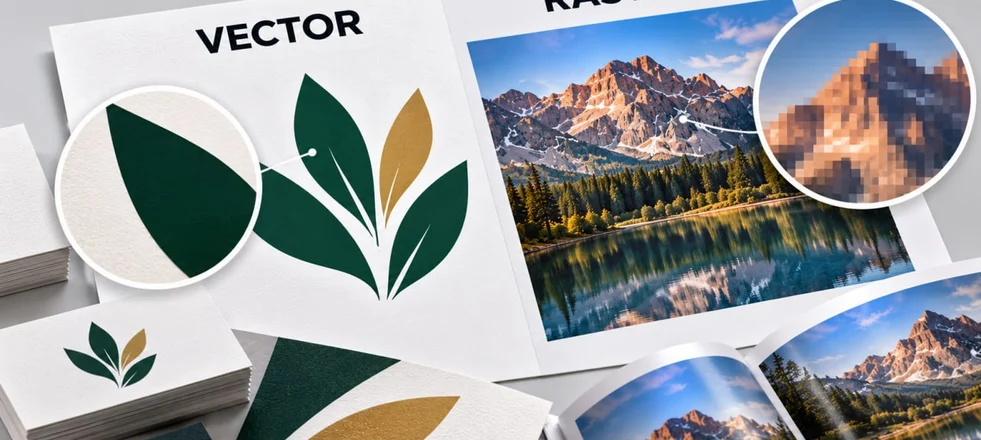
A raster image is made from individual pixels. Each pixel contains colour information, and together they form the complete picture.
Photographs are the most familiar example. A camera records millions of pixels, allowing the image to reproduce subtle changes in colour, texture, light and detail.
A vector graphic works differently. It is built from mathematical paths defined by points, lines, curves and shapes.
A logo consisting of a circle, lettering and several geometric elements can therefore be described mathematically rather than as a fixed grid of pixels. This distinction becomes important as soon as the artwork needs to be enlarged or reduced.
Why Vector Graphics Can Be Scaled
Because vector artwork is defined by mathematical relationships, it can normally be enlarged or reduced without losing the sharpness of its edges.
A company logo created as vector artwork can be used on a business card, brochure, exhibition graphic or large-format display while retaining clean contours. This is particularly useful for:
- logos and brand marks;
- icons;
- line illustrations;
- diagrams;
- simple technical graphics;
- typography-based artwork;
- packaging elements that need precise cutting or reproduction.
The same vector artwork can often be adapted to several production sizes without creating a separate high-resolution image for each one. Raster artwork does not behave in the same way.
What Happens When a Raster Image Is Enlarged?
A raster image contains a fixed number of pixels.
If an image contains enough pixels for its intended physical size, it can reproduce sharply when printed. If it is enlarged beyond what its available resolution can support, the image has to cover a larger area without gaining any additional original detail.
The result can be visible pixelation, softened edges or a loss of fine detail. This is why a small image copied from a website may look acceptable in a presentation but fail when used for a printed brochure, poster or packaging.
The important point is that an image's pixel dimensions do not by themselves tell you whether a raster file is suitable for print. The pixel dimensions need to be considered together with the intended physical output size.
Resolution Depends on Final Size
For print artwork, image resolution is more precisely described in PPI (pixels per inch), which relates the number of pixels to the physical size at which the image will be reproduced. DPI (dots per inch) is more commonly used to describe the resolution of a printing or output device, although the terms are often used interchangeably in everyday print discussions.
The practical question is not simply whether an image is “high resolution”. It is whether it contains sufficient pixel information at the size at which it will actually be printed.
For example, an image that is suitable for a small printed leaflet may not contain enough information to cover a much larger display. Conversely, a very large photograph may contain considerably more data than necessary for a small printed piece. This is why images should be evaluated at their final dimensions rather than judged only by how large or sharp they appear on a computer screen.
Photographs Are Normally Raster
Raster graphics are not inherently inferior. They are the appropriate format for many types of visual content.
Photographs depend on continuous tonal and colour variation that is naturally represented by pixels. Product photography, architectural images, lifestyle photography and detailed textures are therefore normally supplied as raster images.
JPEG, TIFF and PNG are common raster formats, although their suitability depends on the intended production workflow and the way the file has been prepared. Trying to recreate a complex photograph as vector artwork would not normally provide a practical advantage.
The question is not “Which format is better?” but “What type of artwork is being reproduced?”
Logos Usually Belong in Vector Format
Brand marks are one of the strongest examples of where vector artwork matters.
A logo may need to appear at several sizes and on very different printed products during the same campaign: stationery, brochures, packaging, signage, exhibition graphics and promotional materials.
A vector master file provides much greater flexibility because the artwork can be resized while preserving the design’s geometry.
Common vector formats include AI, EPS and SVG. PDF can also contain vector artwork and is widely used for supplying final print files.
However, the file extension alone does not guarantee that everything inside the file is vector. A PDF, for example, can contain photographs, rasterised text or a mixture of vector and raster elements.
A Vector File Can Still Contain Raster Images
This is an important distinction when checking artwork.
A designer may place a photograph inside an Illustrator or InDesign document and then export the finished design as a PDF.
The PDF itself may be perfectly suitable for printing, but the photograph inside it remains raster artwork. Likewise, a vector logo can be placed over a raster background.
Therefore, asking only “Is it a vector PDF?” is not enough. The production file needs to be assessed according to what each individual element contains and whether each element is suitable for its intended use.
Text Is Another Important Case
Live text is normally preserved as vector information when a professional print PDF is exported. This allows characters to retain their precise shapes at different sizes.
Fonts can still cause production problems if the document relies on fonts that are unavailable to the recipient or if the file is exported incorrectly.
For final artwork, fonts may be embedded in the PDF or text may be converted to outlines where appropriate, depending on the production workflow and the printer's requirements.
However, converting everything to outlines is not automatically the best solution. It removes the ability to edit the text easily and can make corrections more difficult. The right approach depends on how the artwork will be supplied, checked and produced.
Colour Works Differently Too
The vector-versus-raster distinction is not the same as the RGB-versus-CMYK distinction. These describe different aspects of an image.
Vector or raster describes how the visual information is constructed.
RGB or CMYK describes how colour is represented.
A vector graphic can contain colour specified for print, and a raster photograph can also be prepared for a particular printing process. Conversely, either type can be supplied with inappropriate colour settings.
For commercial printing, colour mode, embedded profiles and the intended printing process need to be considered separately from image type. This distinction prevents a common misunderstanding: converting a JPEG to a PDF does not automatically make it suitable vector artwork or improve its resolution.
Some Production Tasks Require Vector Artwork
Certain print and finishing processes depend on precise paths rather than pixels.
This can be relevant to:
- die-cutting;
- cutting vinyl;
- plotter work;
- engraving;
- some forms of signage production;
- preparation of certain finishing elements.
A cutting contour, for example, needs a clearly defined path that production equipment can interpret. A blurred edge in a photograph cannot serve the same function. This is one reason why packaging, labels and custom-shaped printed materials often require vector elements even when the main artwork also contains photographs.
What About Large-Format Printing?
Large-format work sometimes causes unnecessary confusion because people assume that everything printed at a large physical size must be vector. That is not true.
A large photograph can be printed successfully if its effective resolution is appropriate for the final size, application and viewing distance.
A billboard, exhibition graphic and close-view poster do not necessarily require the same image resolution because viewers interact with them from different distances.
For large-format production, the correct question is therefore not simply “Is the artwork vector?”
It is:
“Does each element contain enough usable information for its final size, viewing distance and production method?”
Choosing the Right File for Different Print Products
A typical commercial print job may contain both formats.
A brochure might use:
- a vector logo;
- live or outlined typography;
- raster product photographs;
- vector icons;
- vector diagrams.
Packaging can contain the same combination, plus vector cutting and creasing paths.
A poster may use a large raster photograph with vector typography and branding.
The strongest production file is therefore often a combination of vector and raster elements, with each used where it is technically appropriate. The aim is not to force an entire design into one format, but to make sure that every element is prepared in the form required for its particular function.
How to Check a File Before Sending It to Print
Before submitting artwork, check the following.
Logos and line graphics: use the original vector artwork whenever available.
Photographs: check pixel dimensions and effective resolution at the final physical size.
Text: ensure fonts are correctly embedded or otherwise prepared according to the printer's requirements.
Colour: confirm that the document and images are prepared for the intended printing process.
Special production elements: supply cutting paths, white ink layers, foil areas or other technical layers as specified by the printer.
PDFs: remember that a PDF can contain both vector and raster content, so the file extension alone does not tell you whether the artwork is suitable.
The Practical Rule for Commercial Printing
The simplest way to think about the difference is this:
Vector graphics are built to describe shapes.
Raster graphics are built to describe pixels.
Use vector artwork when precision, clean edges and flexible scaling matter. Use raster images when the artwork depends on photographic detail, texture and continuous tonal variation.
Most professional print files need both.
The goal is not to convert every image into one format. It is to make sure that each element is supplied in the form that preserves the quality and functionality required by the final printed product. A logo should remain sharp. A photograph should contain enough information for its physical size. A cutting path should remain mathematically precise. The final PDF should preserve all of these requirements rather than simply looking correct on screen.